Your Mac stays focused on your work.
Something in the background is stealing the machine from the app you are in. Hush finds it, names it in plain English, and quietly steps it back, so your foreground stays fast. Nothing to configure, nothing to sign in to: it works the moment you open it.
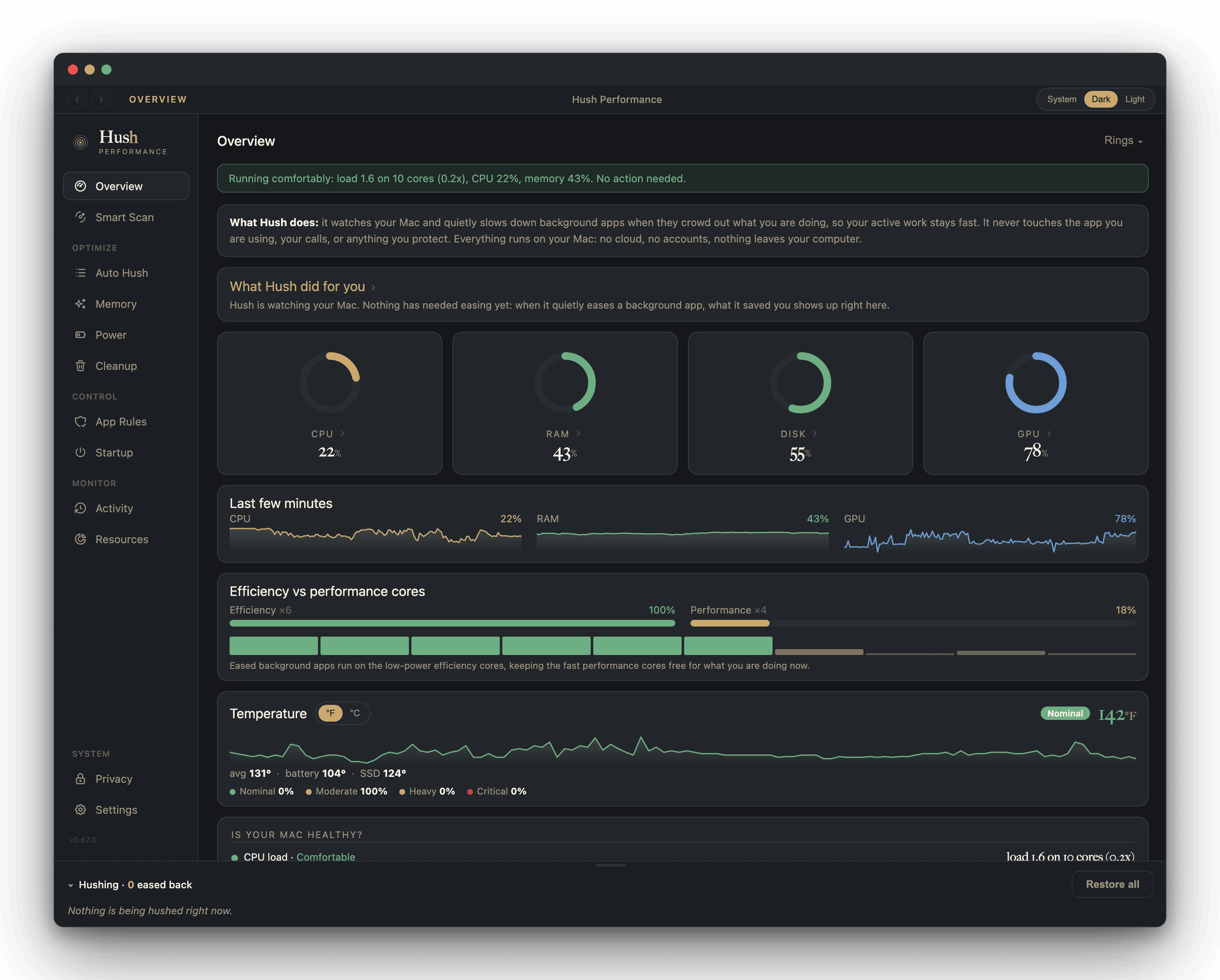
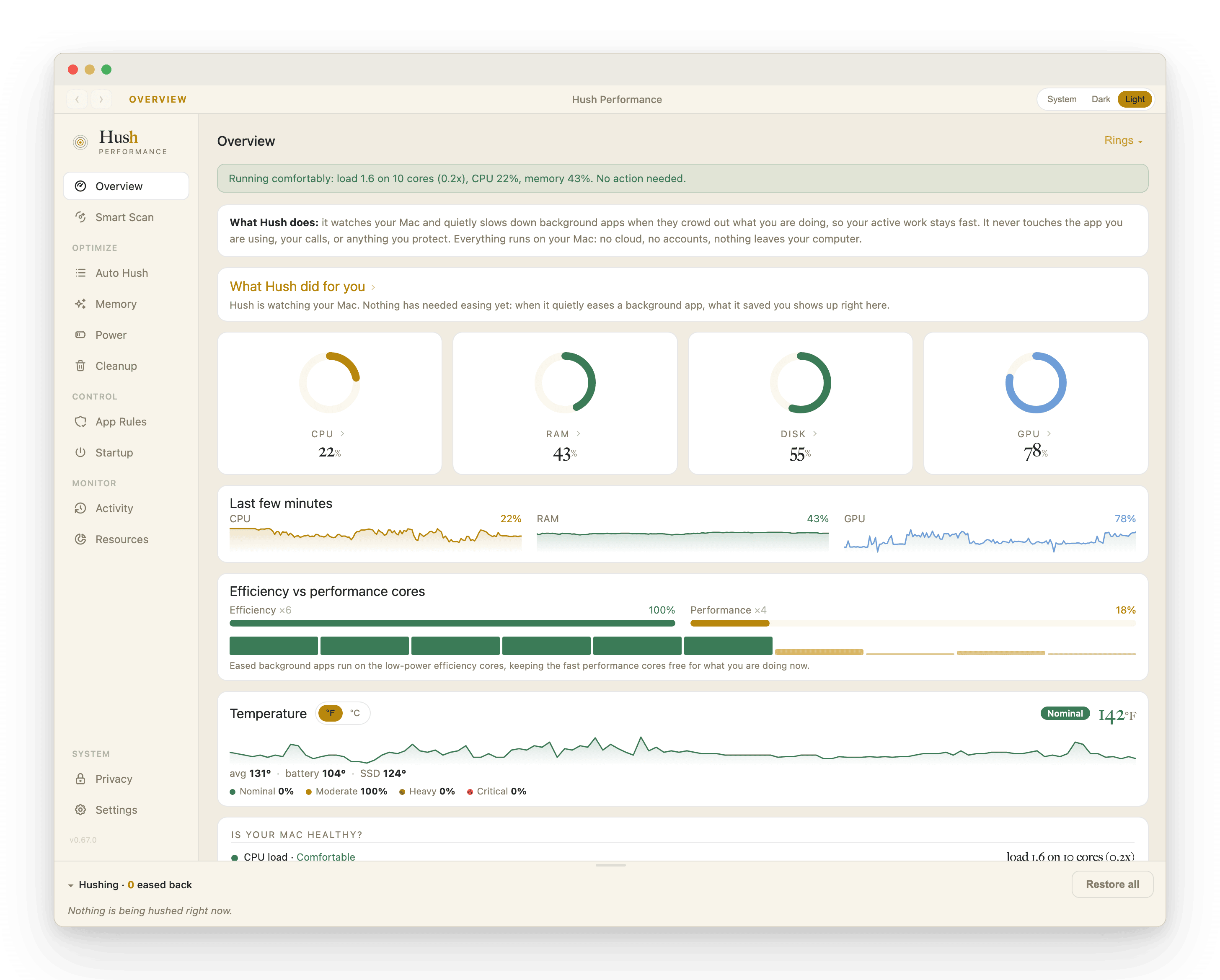
The Overview: every signal at a glance, and the background already eased back.
Running comfortably, and staying that way, right where you work.
The app you are in is fighting for its own Mac.
A background app hogs the CPU while you are not touching it. The app in front stutters and beachballs anyway. Fans spin up, the Mac runs hot, the battery drains, and nothing on screen says why. The usual fix is Activity Monitor: hunt the culprit, force-quit it, lose unsaved state, repeat next week.
And it always seems to land at the worst possible moment: mid-build, mid-recording, mid-call, right when the Mac needs to be quiet. 15 minutes here, half an hour there, week after week, it quietly adds up to days of your year spent hunting the culprit down and forcing it to quit.
There is a sharper failure in the tools that promise to fix this. Across public reviews of the category, the same two betrayals repeat: the watcher process becomes the new CPU hog, and the throttler slows down the very app the user is working in.
Hush is built against exactly those failure modes. The app you are in is structurally exempt from easing, and everything Hush does is listed on screen, reversible, and explained.
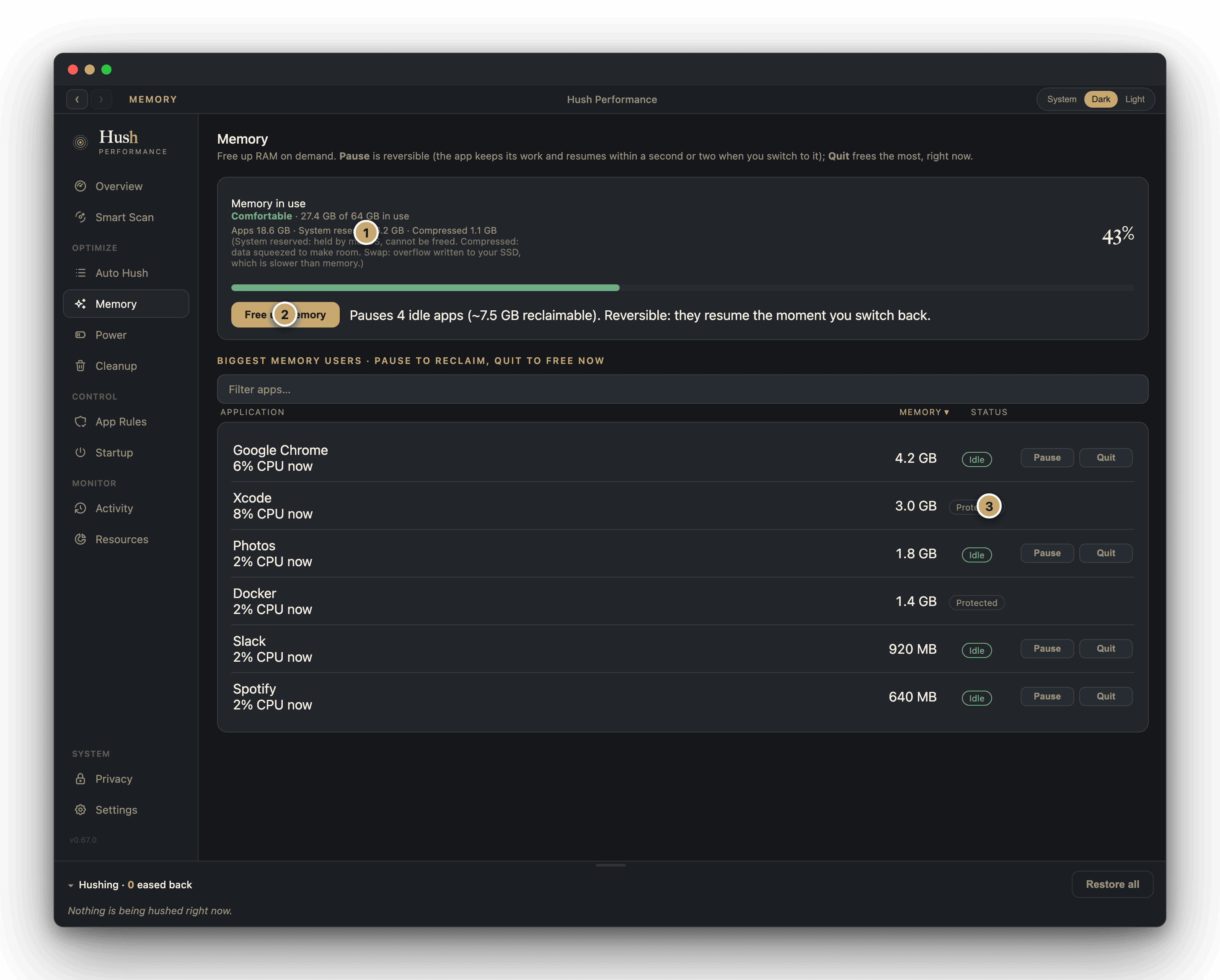
The number that matches what your Mac sees.
Hush reads memory from the same source macOS reports to Activity Monitor, and shows the parts a single percentage hides: how much is in use, what is in swap, and what macOS has compressed. The numbers never contradict the system, a failure users report in other tools.
Compressed memory is not a warning. It is macOS shrinking inactive pages in place so they stay in fast RAM instead of going to disk. The gauge colors by pressure, not by a raw percentage, so a high number in a low-pressure color reads for what it is: your Mac working efficiently.
- 1Memory, in full. Used, swap, and compressed, the same figures macOS reports, labeled rather than collapsed into one number.
- 2Free up memory, on demand. One click pauses only the idle apps that are safe to free, and shows you the measured before and after.
- 3Never the wrong app. Your AI sessions, the app you are in, and anything protected carry no action buttons. Hush cannot touch them.
What set it off, named.
Activity Monitor shows you a long list of processes named like WindowServer and com.apple.WebKit.GPU. Hush goes one step further and attributes each hungry process back to who spawned it: the app you opened, a background sync job, a script, or a specific AI session, resolved to its own name. Terminal work is attributed to the actual command, not lumped under the shell, a gap users flag in every tool that came before.
So a spike is never a mystery. You see that the load is "a Claude session and the work it spawned," or one app's helper, and you decide what to do about it, in one place.
- ▷Grouped by origin. Helpers, tabs, and child processes fold into the app or session that started them, instead of scattering down the list.
- ▷AI sessions, named. A busy automation is shown by its own title, so you act on the right one and leave the rest running.
- ▷Builds and simulators, protected by name. Xcode, the build toolchain, and the Simulator are recognized out of the box and never frozen. A sync client gets eased; your archive keeps building.
When your Mac starts competing with you, Hush steps in.
When background CPU climbs or memory pressure rises, Hush eases back the processes competing with your work. Not frozen. Not quit. Stepped into the background lane, so the app in front keeps its headroom, then released the moment the pressure passes. A brief spike is never touched: only an app that stays hot past its grace period becomes a candidate at all.
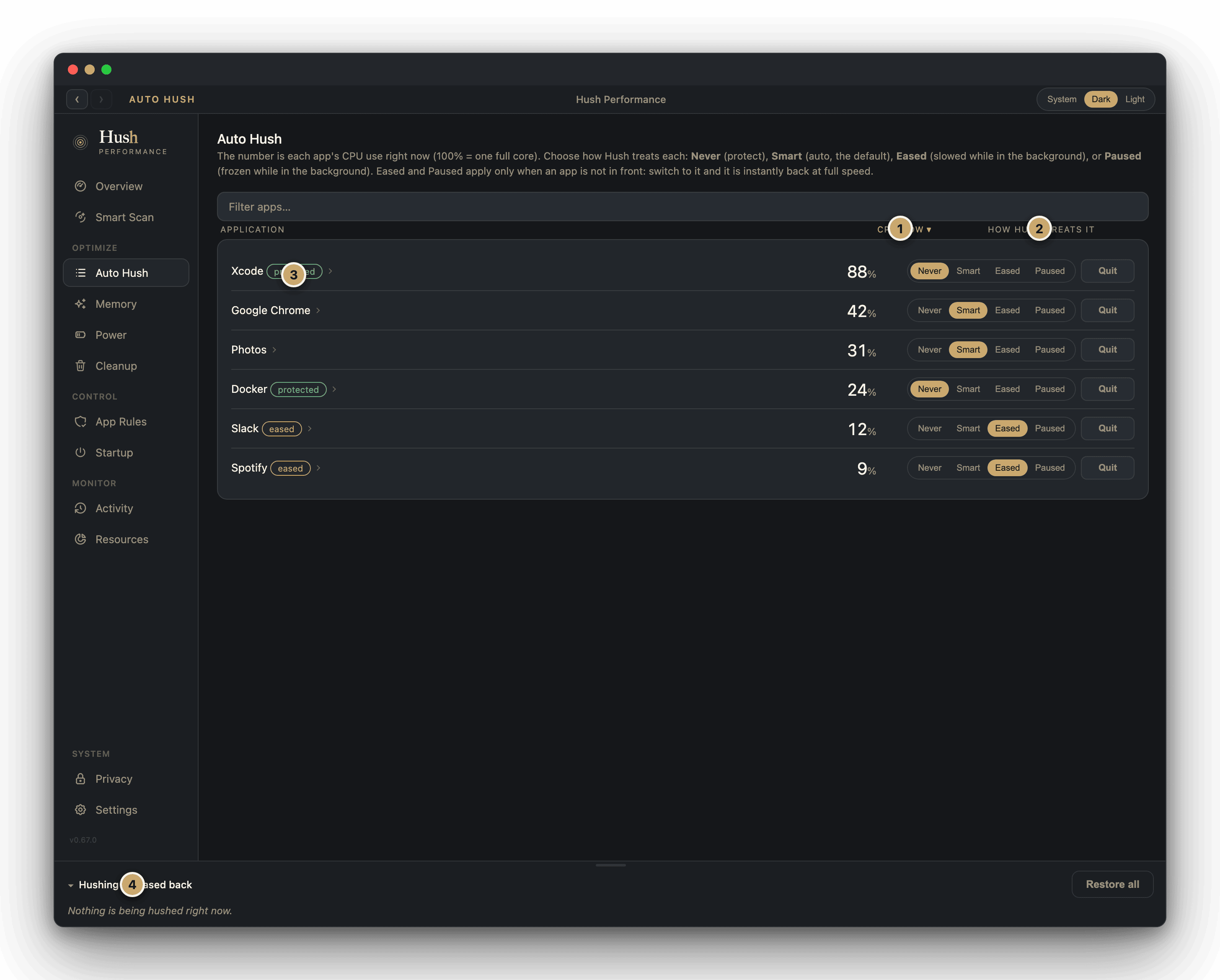
Every app shows exactly how Hush is treating it, and you can override any of it: protect an app, let Hush decide, ease it back for good, or pause it.
- 1CPU now. Each app's live processor use, where 100% is one full core.
- 2How Hush treats it. Never, Auto, Eased, or Paused, set per app. Auto is the default and does the work for you.
- 3Protected stays protected. An app you mark Never is shown plainly and left alone.
- 4What is eased right now. The apps Hush is currently holding back, visible at a glance, released automatically.
Quiet a hog for ten minutes, with one tap.
You can see an app eating your Mac, and now you can act on it right there. Every item on the Overview is clickable, and Snooze Hush is one tap away: it steps that app and its whole family into the background lane for ten minutes, hands the cores to what you are doing, then restores it on its own. Switch back to the app and it is instantly full speed again. Nothing is quit, nothing is frozen, and you never have to remember to turn it back on.
The fastest way to take back your Mac in the moment. No settings, no lists to build. See the hog, tap Snooze, keep working. Ten minutes later it is back on its own.
The "give me my whole machine back" button.
Some days the Mac is oversubscribed by the very things you deliberately let run: a wall of AI sessions, a photo library indexing, heavy background apps you trust. Super Hush is the time-boxed claw-back for those moments.
Safety is structural, not a setting. The frontmost app and its whole bundle are always alive, in-flight builds are never orphaned, and the entire window auto-reverts. You cannot forget to undo Super Hush.
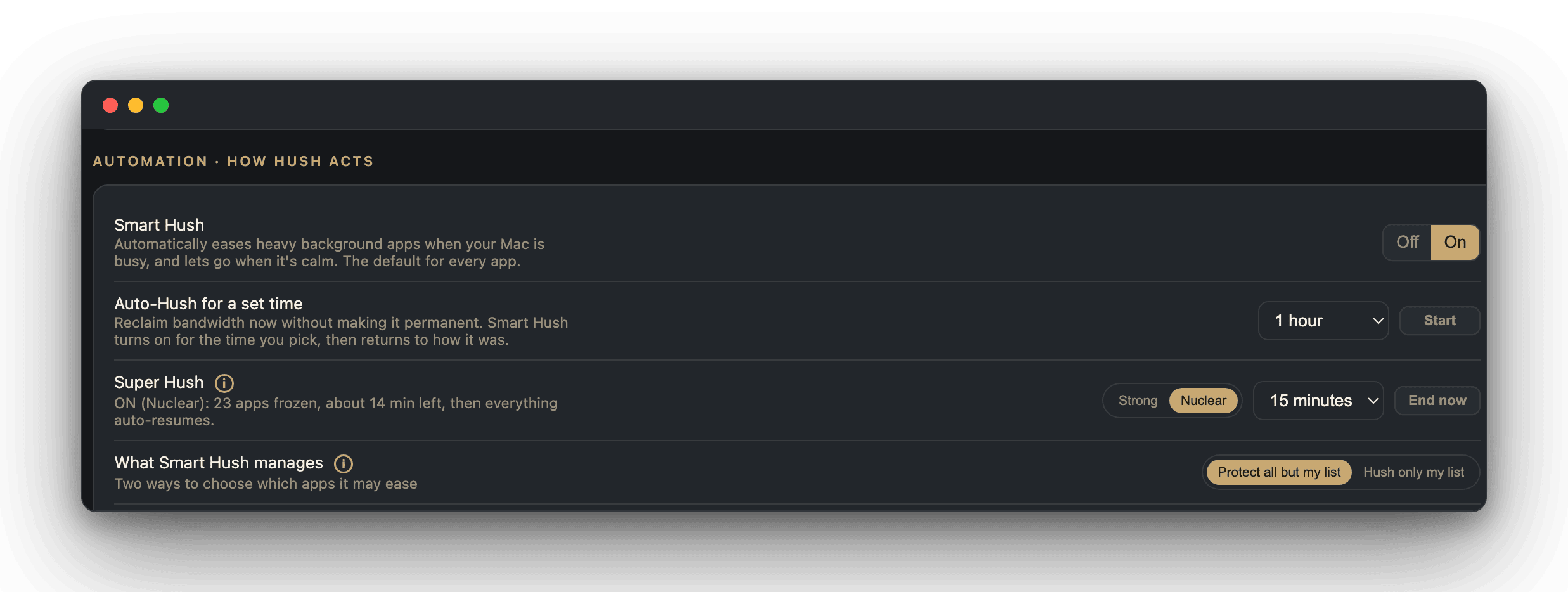
Armed, mid-countdown: 23 background apps frozen, reverting on their own in about 14 minutes.
Your Mac stays fast even when everything hits at once.
Super Hush is the button you press. Storm Burst is the one that presses itself. Some slowdowns are not one hog but a pile-up: a backup upload, a photo library reindexing, a hot browser tab, and a stray simulator all landing together, so the whole machine runs several times over its capacity while no single app looks alarming. Others are quieter still: memory paging to disk, one process pegging a core, or heavy disk traffic, any of which can drag the whole Mac while the load looks ordinary. Storm Burst watches for all of it and steps in on its own.
On by default, and one of the best reasons to run Hush. The pile-up days are exactly when a Mac feels worst and Activity Monitor helps least. Storm Burst is the guardian for those moments, working before you even notice the slowdown, and undoing itself before you would have to.
Walk away on battery, and your work keeps running.
On battery, your Mac sleeps a few minutes after the screen goes dark, and a long job you left running dies with it: a render, a build, a backup, a large download. Turn on Stay Awake and nothing sleeps until the charge falls to the level you pick, so the work finishes. Then it conserves, so you are never stranded with a dead battery. Closing the lid always sleeps the Mac, whatever this is set to.
Leave the long job running and step away. Off by default, yours to turn on, and it never overrides a closed lid or spends past the reserve you set.
One quiet app, the whole health picture.
The same discipline runs through everything else Hush does. Every scan below is read-only: Hush looks first, tells you what it found, and changes nothing until you choose it.
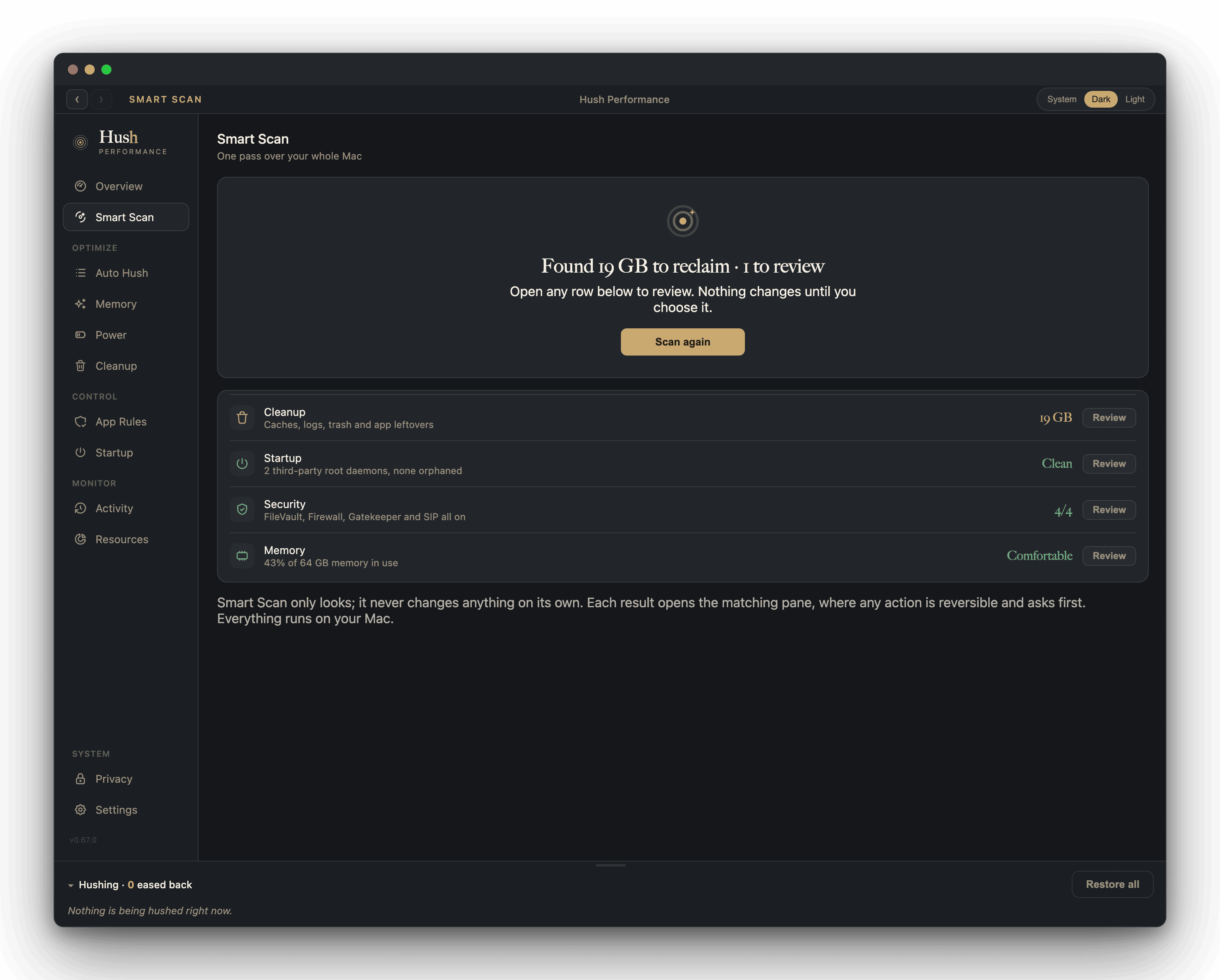
One button over the whole Mac: cleanup, startup, security, and memory, checked in one quiet pass, each result opening the matching pane.
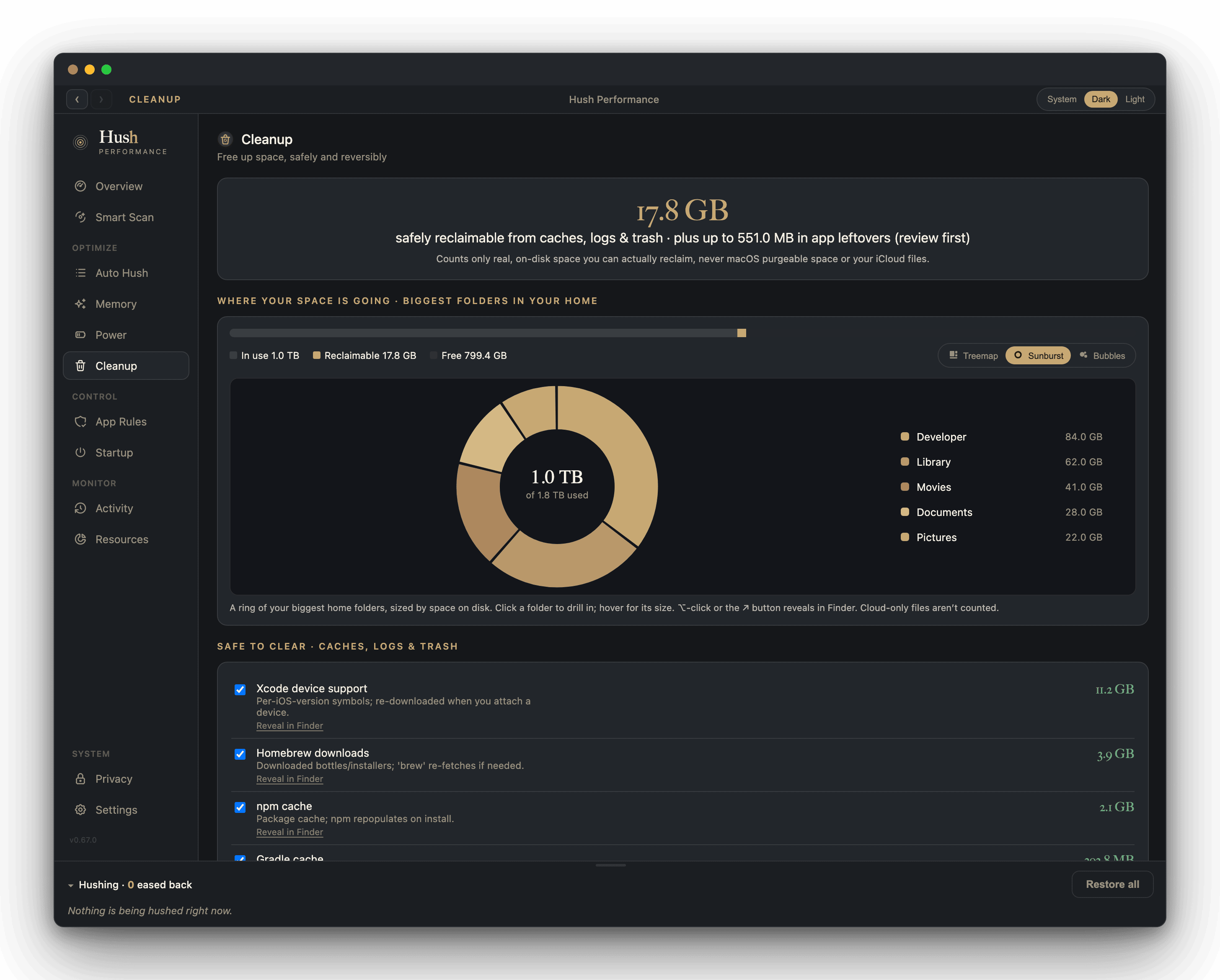
Caches, logs, trash, app leftovers, installers, and old device backups, counted as real on-disk space you can actually reclaim, never inflated with purgeable space or your iCloud files. Removal goes to the Trash, reversibly.
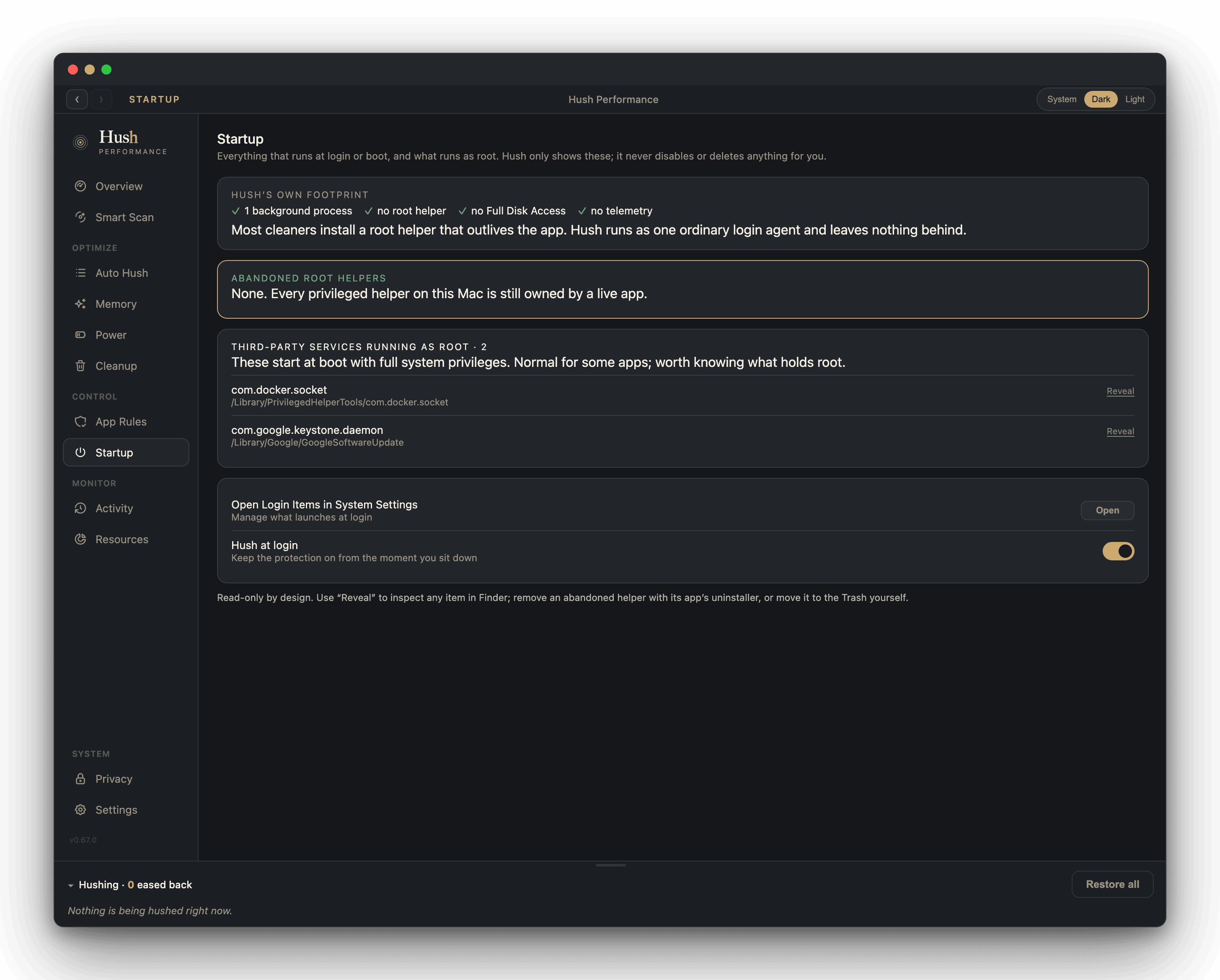
Everything that runs at boot, and what runs as root, laid out plainly. Hush reveals each item in Finder; it never unloads or deletes behind your back.
One click, one sentence: the culprits by name, in plain language, with a safe remedy each. The same live diagnosis is exposed locally for scripts and power users.
Safe tune-ups that need no admin password: what Hush can do, it does; what needs more access, it says so instead of pretending.
Every signal, read straight from the system itself: usage, live throughput per app, battery health and power draw, GPU load, and thermal pressure.
By default Hush needs no admin. Grant Deep Reach once and it can also quiet the system-level background work macOS shields from an ordinary app, like your backup upload or Spotlight's indexer. It only ever slows things down, reversibly, and never reads a file.
The whole Mac, checked in one pass.
Cleanup, startup, security, and memory, looked over together and rolled into one clear verdict. Every row opens the matching pane, where any action is reversible and asks first.
Gigabytes you can actually reclaim.
Caches, logs, trash, and app leftovers, counted as real on-disk space and shown beside a map of your biggest folders. Never inflated with purgeable space or your iCloud files, and every removal goes to the Trash, reversibly.
See what runs at boot, and what runs as root.
Login items and privileged helpers laid out plainly, with Hush's own footprint shown alongside: one login agent, no root helper, no telemetry. Reveal any item in Finder; Hush changes nothing for you.
Everything happens right on your Mac.
Hush opens no connection to any remote server. Its window talks only to its own engine, on a local link, so your performance data has nowhere else to go.
Nothing to sign in to. No telemetry we collect. No cloud. No silent ownership games: Hush is built and signed by Epiphani Studios, and updates come from our own feed, announced in the app.
Smart defaults for every Mac. Full control for yours.
Hush works the moment you open it, calibrated to handle CPU and memory pressure with no setup. For those who want to see exactly what it is doing, and change it, everything is exposed and overridable.
Monitors tell you what is happening. Hush also does something about it.
Many fine Mac tools show you the numbers. Hush reads the same figures macOS reports, explains them in plain English, and then acts, easing back the background so your work stays fast. Here is the head-to-head.
| Feature | Hush | App Tamer | iStat Menus | CleanMyMac | Activity Monitor | Stats (open source) |
|---|---|---|---|---|---|---|
| Automatic background easing when pressure rises | Yes | Yes | No | Manual scan | No | No |
| The app you are in is never touched, by architecture | Yes, structural | Users report failures | n/a | n/a | n/a | n/a |
| Plain-English "why is my Mac slow" answer | Yes, always on | No | No | No | No | No |
| Builds, simulators, and AI sessions protected by name | Yes, out of the box | No | No | No | No | No |
| Provable near-zero self-overhead (shown, not claimed) | Yes, visible number | No, reported opposite | n/a | n/a | n/a | Claimed |
| Terminal work attributed to the actual command | Yes | Reported gap | Partial | No | No | No |
| Numbers match what macOS itself reports | Yes, same source | Reported mismatch | Yes | Partial | The reference | Yes |
| Settings survive updates | Yes, plain file | Unknown | Reported loss | Unknown | n/a | Yes |
| Price | Free tier; Pro $39 once | $14.95 once | Paid / Setapp | Subscription | Free, built in | Free |
Competitor cells reflect public documentation and user reviews as of July 2026; "reported" marks issues users describe in public reviews, linked below. The closest analog to Hush's plain-English answer is the indie tool MacStats, a click-to-ask AI explainer; Hush's narrator is always on and names the action it took. Small single-purpose tools like AppPolice and MagicQuit prove parts of this pain; Hush covers those jobs in one app.
This pain is real, and the old fixes keep failing.
“My fans are running crazy every time I start Docker Desktop... my laptop is burning hot and my fans are trying their best but still fail to maintain a decent temperature.”
“I've found that the helper process is using more CPU than all of the other processes it's supposed to be monitoring combined.”
“Instead of speeding up my Mac, it started slowing down apps that I was actively working on.”
“Settings do not propagate, colors do not update properly, frequent freezes and restarts with nothing saved.”
Real, sourced quotes about this category and competing products, shown as industry voices describing the problem. They are not Hush customers and not endorsements of Hush.
One price. No surprises.
Every price is one-time. No subscription, nothing to sign in to beyond your license, and the free tier is permanent, not a trial.
- Every live signal: CPU, memory, disk, network, battery, GPU, heat
- Auto Hush easing, Super Hush, and per-app protection
- Source attribution, AI sessions named
- "Why is my Mac slow?" in plain English
- Smart Scan, startup audit, and every read-only view
- Everything in Free, plus the hands:
- One-tap cleanup: caches, logs, and trash, reversibly
- Uninstall any app and everything it left behind
- Remove leftovers from apps you already deleted
- Everything in Pro
- Duplicate finder: reclaim space from exact copies
- Similar-image cleanuparrives as a free update
For scale: the closest paid alternative costs $14.95 and users still report it slowing the app they were working in. The real alternative, doing nothing, means losing the same minutes over and over to hunting down and force-quitting the apps pinning your Mac. Hush pays for itself the first time it saves a build.
The free download is ready now. Pro and Complete are one-time purchases through secure checkout, and your license key arrives in your inbox right after you buy.
Questions, answered.
Is this another memory cleaner?
No. Hush does not flush memory to make a number look smaller. It reads the same figures macOS reports, and when you free memory it pauses only the idle apps that are safe to pause, then shows you the measured before and after. A cleaner that dumps your working set just forces everything to reload on your next click.
Will it slow down the app I am working in?
No. Hush only eases back background processes. The app in front, your AI sessions, and anything you mark protected carry no action and are left alone. This is the single most damaging failure users report in other tools, and it is excluded here by architecture, not by a setting you could get wrong.
What does Hush actually do to a background app?
It moves the app into the macOS background scheduling tier, the same reversible signal the system already uses to decide what runs first. The app keeps running and stays open; it just stops competing for the processor while it sits idle. Switch to it and it returns to full speed. Nothing is force-quit.
How much CPU does Hush itself use?
Watch it. Hush shows its own live CPU and memory in the sidebar, the Overview footer, and Settings at all times, not only when you go looking for it. If Hush's own engine ever becomes a sustained hog, the same easing rule it applies to any other app applies to itself: it eases back and records the action in Activity, then restores the moment it settles. The number is read from the same process accounting Activity Monitor uses, so it is never a marketing claim.
Is high memory usage a problem?
Usually not. macOS fills RAM on purpose and compresses inactive pages in place. The signal that matters is memory pressure, not the percentage. Hush shows the pressure color so you know when a number is worth acting on, and when to leave it alone.
Can it really tell which AI session is busy?
Yes. Hush traces a process back to what started it and groups the helpers, scripts, and child processes under that source, so a busy automation shows up by its own name rather than as a dozen anonymous entries. You act on the one that matters and leave the rest running.
What can Hush reach? Does it send anything out?
Hush reads only what macOS exposes to any local app, and it opens no connection to any remote server, so there is nothing to send. Open Little Snitch or Proxyman while it runs and watch the network stay quiet.
What is free, and what is paid?
The free tier is the whole guardian: every live signal, Auto Hush, Snooze Hush, Super Hush, Storm Burst Protection, protection, attribution, and every read-only scan, permanently. Pro ($39, one-time) adds the cleanup hands: one-tap cleanup, app uninstall, and leftover removal. Complete ($59, one-time) adds the duplicate finder. Seeing is always free; acting on disk is what you pay for once.
What happens to my settings when Hush updates?
They live in a plain file on your Mac, and updates merge new defaults into it rather than replacing it. Move to a new Mac, copy the file, and your tuning comes with you. Updates arrive quietly from our own signed feed and are announced in the app.
Which Macs does it run on?
Apple Silicon, on macOS 15 or later.
Buy it once. It runs on your Mac for as long as you need it.
No subscription. Nothing to sign in to beyond your license. No cloud dependency. If Epiphani disappeared tomorrow, Hush keeps running, and every setting stays in a plain file on your Mac.